Create custom visuals faster with AI built for scientists

Create and edit icons tailored to your research, and get fast first drafts for protocols, timelines, and flowcharts - powered the world’s largest scientifically accurate visual library.
Try AI features for free
Free to try. Upgrade anytime with a paid BioRender plan.

Create custom visuals faster with AI built for scientists

No more waiting weeks for custom icons or spending hours on tedious edits. Introducing the first of a new wave of AI tools designed to help scientific visuals keep pace with modern research - without sacrificing accuracy.
Try AI features for free
Free to try. Upgrade anytime with a paid BioRender plan.

Make your own icon is finally here

Turn any image into a BioRender style visual, then refine, or start from a BioRender icon and customize every detail.

Turn any visual into a cohesive BioRender style

Upload any image - photos, screenshots, or references - and instantly convert them into clear, BioRender-style visuals that keep your figures consistent and easy to interpret.
Try it now

Remove backgrounds in one click

Instantly match any presentation style, seamlessly integrating visuals into your figures and slides without the manual reformatting.
Try it now

Fix what’s wrong without breaking what’s right

Use custom AI prompts to make targeted edits to any icon or figure element, precisely matching your science no matter how novel or unconventional.
Try it now

Create a first draft

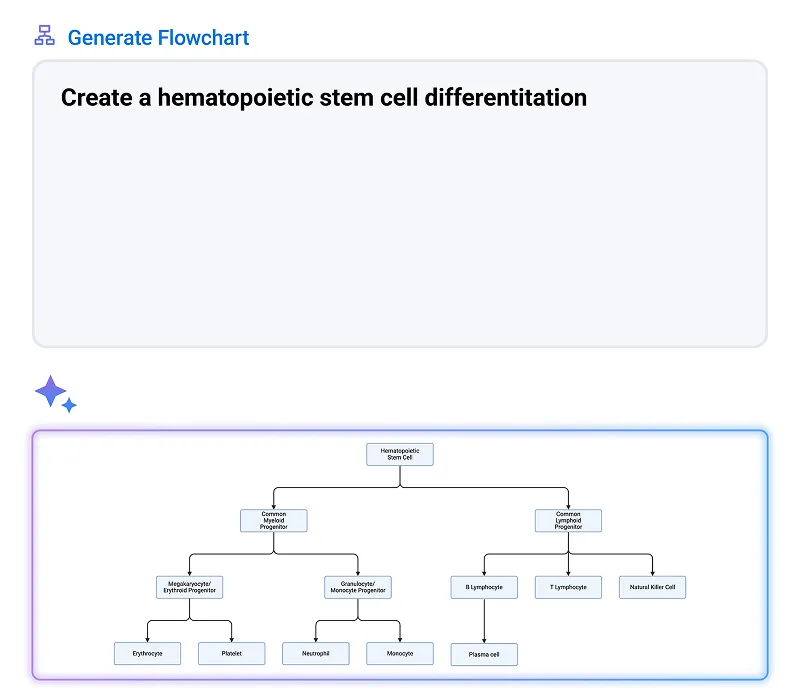
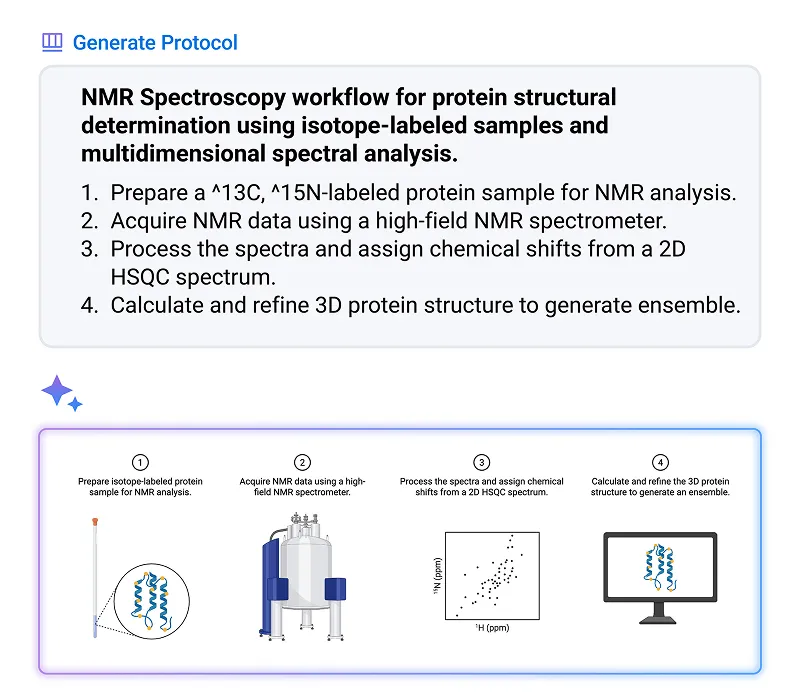
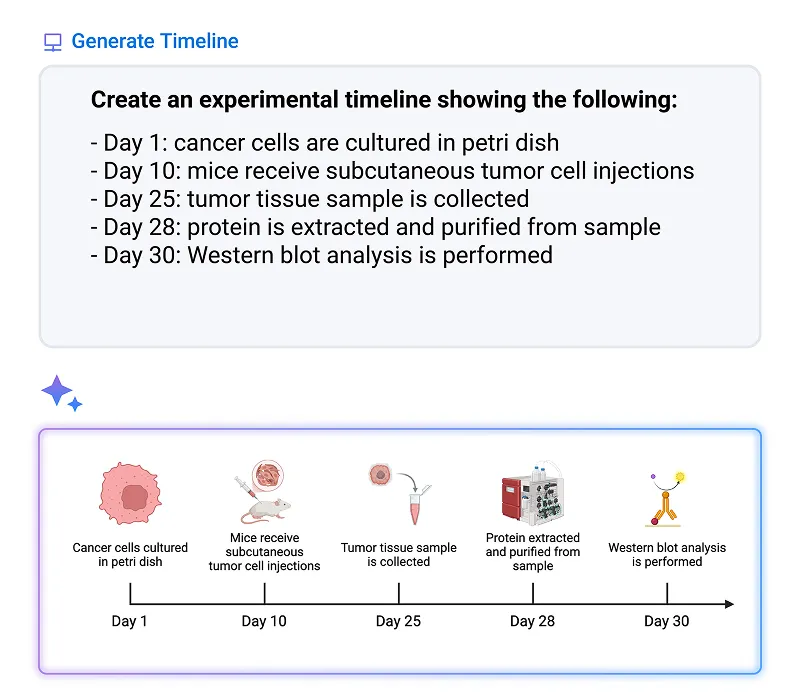
Describe what you need, and BioRender AI assembles a first draft of flowcharts, protocols, or timelines that you can refine and edit.
Flowchart depicting hematopoietic stem cell differentiation branching into common myeloid and lymphoid progenitors, further differentiating into various blood cells including erythrocytes, platelets, neutrophils, monocytes, B and T lymphocytes, plasma cells, and natural killer cells.

Flowchart

Clarify complex logic with ease. Convert text into clean, editable flowcharts that your whole team can follow.
Try it now
Workflow diagram for NMR spectroscopy protein structural determination with four steps: preparing isotope-labeled protein sample, acquiring NMR data using high-field spectrometer, processing spectra with 2D HSQC spectrum, and calculating 3D protein structure to generate ensemble, accompanied by related icons.

Protocol

Eliminate hours of manual formatting. Convert your written methods into clear, editable protocol diagrams instantly.

Try it now
Experimental timeline illustrating key steps: Day 1 cancer cells cultured in a petri dish, Day 10 subcutaneous tumor cell injections in mice, Day 25 tumor tissue sample collection, Day 28 protein extraction and purification, Day 30 Western blot analysis.

Timeline

Simplify updates to evolving study designs. Describe your design once and get an editable timeline that can evolve with your research.
Try it now
security icon

AI built with security in mind

Your content is protected with the same security and privacy standards as all data in our systems. We do not use user-uploaded or created Customer content (e.g. user-created files, uploads) to train our models without your knowledge.

FAQs

Is my data used to train BioRender’s AI?

No. The content you upload or create in BioRender is never used to train our AI models.

How scientifically accurate are BioRender AI outputs?

AI outputs are strong starting points, but we always recommend reviewing before use in formal or research settings. Our protocol, timeline, and flowchart generator tools pull from our library of scientifically vetted icons and figures, making them more accurate than general AI tools out of the gate.

What AI models power BioRender’s features?

BioRender uses enterprise versions of leading AI models, selected for their technical capabilities and strong security and privacy standards. You can see exactly which ones in our subprocessor list at security.biorender.com.

Can I still edit AI-generated figures in BioRender?

Yes. Our protocol, timeline, and flowchart generator tools are built from BioRender components, so they remain fully editable. Images made with Make your own icon tools and custom figure generator result in flat PNGs, which can be further refined using our AI image editing tools.

How does the AI credit model work?

You purchase what you need and use them at your own pace. You can purchase more at any time. AI credits can also be pooled and allocated across your team. For managed teams, reach out to your BioRender representative to purchase AI credits. More details about the AI credit model are available here.

Start with 50 free AI credits and create custom science visuals even faster.

Claim your free AI credits today

Get started for free today